JuiceSSH has been removed from the Play Store in 2026, and it has not been updated since 2021. On Android 15 and 16, it now crashes, fails to connect, and exposes users to serious security risks. For anyone who managed VPS servers, cloud systems, or home labs using JuiceSSH, this has created an urgent need for reliable JuiceSSH alternatives 2026.
The good news is that today there are better and more secure options available. Many of the best SSH clients for Android now offer active development, stronger encryption, cloud sync, key management, and features that go far beyond what JuiceSSH provided.
In this guide, we will cover the 5 best SSH clients for Android you can use right now as modern JuiceSSH alternatives 2026, so you can move forward with a faster, safer, and fully supported mobile SSH setup.
The End of JuiceSSH: Why the King of Android SSH Finally Fell
For more than a decade, JuiceSSH was the default answer when someone asked for the best SSH client for Android. It was fast, clean, and powerful. Features like identities, snippets, and key management made it a daily tool for sysadmins, developers, and anyone running servers from their phone. But in 2026, that era officially ended.
JuiceSSH has now been removed from the Google Play Store. This was not a random decision. The app has not received any real updates since 2021, and modern Android versions have moved far beyond what it was built for. On Android 15 and Android 16, JuiceSSH fails to meet basic security and compatibility requirements. Key storage breaks, encryption support is outdated, and connection stability is unreliable.
What was once one of the best SSH clients for Android has become a serious risk. Running an unmaintained SSH client means exposing your private keys, passwords, and production servers to bugs that will never be fixed. That is why moving to proper JuiceSSH alternatives 2026 is no longer optional, it is necessary.
Why JuiceSSH Was Removed: The Real Technical Reasons
JuiceSSH did not disappear by accident. Its removal from the Play Store was the result of serious technical and security failures that could no longer be ignored. Here is what actually happened:
Checkout Best Lifetime Windows VPS Hosting 2026 – No Monthly Fees
- It failed Google’s Target API level rules
- Google now requires all Android apps to target the latest Android API levels to remain on the Play Store. By 2025–2026, this meant supporting Android 14, 15, and newer security frameworks. JuiceSSH was still built against very old Android APIs, so it could not pass Play Store compliance. This alone made it ineligible to stay listed.
- The app became abandonware
- JuiceSSH has not been meaningfully updated since 2021. No bug fixes, no security patches, no Android compatibility updates. In 2026 terms, that makes it abandonware. Using abandonware as an SSH client is dangerous because it handles private keys, passwords, and direct access to your servers.
- No support for modern encryption standards
- Older versions of JuiceSSH do not properly support modern SSH cryptography like Ed25519 keys and newer cipher suites. Many servers in 2026 now disable older RSA and weak algorithms. This is why JuiceSSH connections often fail or fall back to insecure methods.
- Broken on Android 15 and 16
- Android’s security model, file system access, and background networking rules have changed. JuiceSSH was never updated to support these changes, so features like key storage, agent forwarding, and even basic connections break or behave unpredictably.
Because of these issues, Google removed JuiceSSH from the Play Store, and security professionals now strongly recommend moving to proper JuiceSSH alternatives 2026 that are actively maintained and designed to be among the best SSH clients for Android.
The 5 Best JuiceSSH Alternatives (Tested and Trusted)
If you are moving away from JuiceSSH, you are not just looking for any SSH app. You need something that replaces identities, key management, snippets, and daily workflow. These are the strongest JuiceSSH alternatives 2026 and also some of the best SSH clients for Android available today.
Checkout Linux VPS Hosting: Key Benefits of Using a Linux VPS Server

Termius: The Most Polished JuiceSSH Alternative in 2026
Termius stands out among the JuiceSSH alternatives 2026 as the polished, feature-rich SSH client built for modern workflows. It looks and feels like a contemporary admin tool rather than a simple terminal app. Termius brings an intuitive user interface, organized host management, and cross-device synchronization that sysadmins have long wanted but never had in JuiceSSH. Whether you’re jumping between Android, macOS, Windows, or Linux, Termius keeps your server list, SSH keys, and preferences in sync through its secure cloud.
This makes Termius not just a replacement for JuiceSSH, but a step up in professionalism and convenience. It wraps powerful features in a clean UI without sacrificing performance or security.
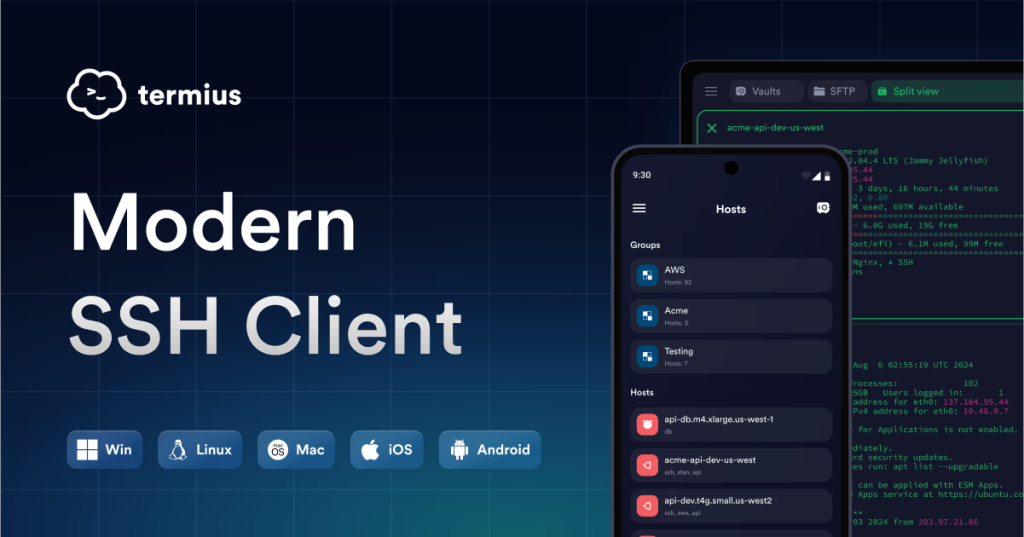
Key Features :
- Cross-platform sync: Keep hosts, SSH keys, and settings consistent across Android, iOS, and desktop operating systems.
- Secure key vault: Store SSH keys and credentials in an encrypted vault instead of loose files.
- Group and tag hosts: Organize your servers logically for fast access.
- SFTP support: View and transfer files over SSH without a separate app.
- Agent forwarding: Work with remote agent keys securely.
- Customizable terminal: Themes, fonts, and layouts that adapt to your workflow.
- Team sharing: Share access securely with other admins (in paid plans).
Pros :
- Best UI among Android SSH clients: Easy to navigate and fast even with hundreds of hosts.
- Real cross-device workflow: Set up a host once and use it everywhere.
- Active development: Regular updates and modern security support keep it reliable on Android 15/16.
- Extended features: SFTP, key vaults, and terminal customization go beyond basic SSH.
Cons :
- Cloud dependency for sync: While the sync service is secure, it means storing data in Termius’s cloud if you want cross-device access.
- Paid features: Some advanced capabilities, like team sharing and encrypted vaults, are behind a subscription.
- Not fully open source: For privacy purists, this may be a drawback compared to truly open-source alternatives.
In short, Termius earns its place as one of the most capable and polished JuiceSSH alternatives 2026 and one of the best SSH clients for Android for professionals who want power and polish in equal measure.
ConnectBot — The Open Source Hero for Secure Android SSH
ConnectBot remains one of the most respected names in Android SSH tooling because it is simple, reliable, and completely open source. For administrators who value transparency, minimalism, and control, ConnectBot is one of the best JuiceSSH alternatives 2026. It doesn’t try to be a full desktop-like environment or cloud service. Instead, it stays lean, focusing on what matters most: secure terminal access and key-based authentication without unnecessary extras.
Because it’s open source, the community can audit its code and maintain it independently of any single company. This appeals to privacy-focused professionals and anyone wary of proprietary cloud sync services. ConnectBot works well on Android 15 and 16, supports modern SSH standards, and keeps your secrets local.
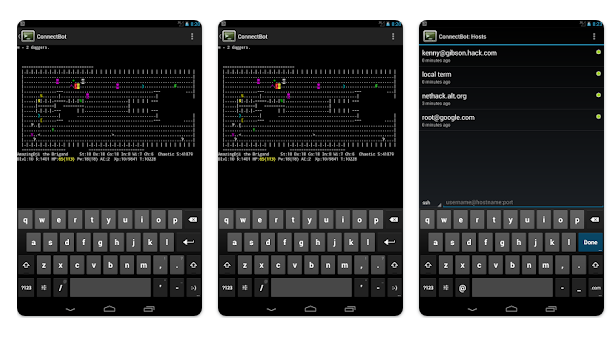
Key Features :
- 100% open source: No hidden code, no tracking, and community-driven updates.
- Lightweight UI: Clean and functional interface that loads quickly on any Android device.
- Multiple sessions: Connect to many servers in separate tabs.
- Key management: Generate and use SSH keys directly within the app.
- Port forwarding: Local and remote tunnels for secure network setups.
- Clipboard integration: Easy copying between terminal and Android system clipboard.
- Root support (optional): For deeper system access on rooted devices.
Pros :
- Free and open source: No charges, no subscriptions, and no cloud lock-in.
- Privacy-first: All data stays on device; no third-party sync unless you add your own tools.
- Stable on modern Android: Active updates mean compatibility with new OS versions.
- Simple and effective: No bloat, just solid SSH connectivity—perfect for quick tasks.
Cons :
- UI is basic: Functional but not as polished as premium SSH clients.
- Limited feature set: Lacks built-in SFTP, cloud sync, or advanced vaults.
- No official desktop app: You can’t sync settings across devices out of the box.
ConnectBot proves that simplicity can be powerful. For anyone who wants a free, privacy-friendly, and dependable SSH client, it remains one of the most trustworthy JuiceSSH alternatives 2026 and one of the best SSH clients for Android.
Termux — The Power User’s Full Linux Shell
Termux isn’t just another SSH app—it’s a complete Linux environment for Android. For sysadmins, developers, and power users who want full control of their mobile terminal, Termux opens up capabilities far beyond simple remote login. You can install native Linux packages, write scripts, run servers, compile code, and of course, use SSH with full customization. Using pkg install openssh, you get a true SSH client that behaves just like what you’d expect on a desktop Linux machine.
Among JuiceSSH alternatives 2026, Termux stands out because it treats your Android device not merely as a terminal window but as a portable Unix workstation. If you have tasks that go beyond basic server access—like text processing, git workflows, or on-device automation—Termux delivers unmatched flexibility.
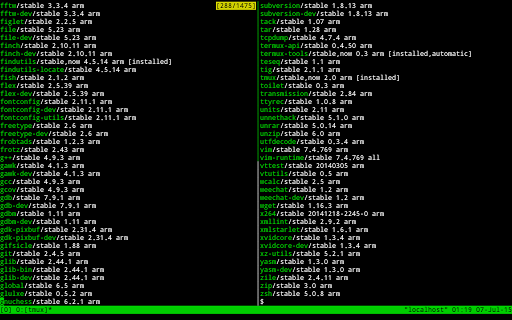
Key Features :
- Full Linux toolset: Install packages with
pkg(git, vim, nano, python, htop, tmux, etc.). - Native SSH and SCP: Use OpenSSH as you would on any Linux system.
- Custom scripts and automation: Build and run scripts locally on the device.
- Terminal multiplexing: Use tmux for session persistence and multi-pane layouts.
- Local servers: Run web servers, SSH servers, or other daemons locally.
- Package repository: Access a wide range of tools from the Termux ecosystem.
- No root required: Most functionality works without rooting your device.
Pros :
- Extreme flexibility: More than just the best SSH clients for Android—it’s a full Linux experience.
- Scripting powerhouse: Automate tasks, manage files, and build custom workflows all on-device.
- Community-driven: Actively maintained by contributors and continuously expanding.
- No cloud dependency: Everything runs locally without external services.
Cons :
- Steeper learning curve: Not designed for casual users; requires comfort with command-line systems.
- No UI host organization: Unlike dedicated SSH apps, Termux does not provide a graphical server list, identities, or cloud sync.
- Battery usage: Because it’s a full environment, tasks can drain battery more rapidly than simple SSH clients.
Termux is one of the most powerful JuiceSSH alternatives 2026 for anyone serious about Linux on Android. If you want more than a remote shell—if you want a mobile development and admin station—Termux delivers unmatched depth and capability.
GSW ConnectBot — The Industrial-Grade SSH Client
GSW ConnectBot takes the core strengths of the original ConnectBot and hardens them for enterprise use. It’s designed for organizations and security-conscious professionals who need dependable, auditable SSH access on Android without sacrificing modern cryptography or operational stability. While many JuiceSSH alternatives 2026 focus on general users or power users, GSW ConnectBot zeroes in on industrial stability, secure configurations, and compatibility with corporate security policies.
This variant includes extended cipher support, better handling of modern Android keyboards and input methods, and enhancements that make it suitable for regulated environments. If your work involves sensitive infrastructure, compliance requirements, or high uptime expectations, this is one of the best SSH clients for Android built with those priorities in mind.

Key Features :
- Enterprise-grade cipher support: Works seamlessly with modern encryption algorithms commonly required by corporate servers.
- Enhanced session management: Better handling of multiple simultaneous connections with robust reconnection behavior.
- Keyboard and UI optimizations: Tailored for complex input, including non-Latin layouts and custom keymaps.
- Strict host key verification: Tools for managing known hosts with secure policies.
- Improved logging: Useful for audit trails and troubleshooting in professional settings.
- Compatibility with Android 15/16 security: Built to meet newer OS requirements without breaking sessions or key storage.
Pros :
- Focused on security: Strong cipher suites and strict SSH policies make it reliable for enterprise use.
- Stable under load: Handles multiple connections without crashing or dropping sessions.
- Good for compliance: Logging and verification behavior supports regulated environments.
- Free and offline: No cloud sync, no external dependencies.
Cons :
- Not as polished as premium clients: The UI isn’t as modern or sleek as Termius.
- Feature set is narrower: It’s focused on stability and security, not extras like SFTP or dashboards.
- Less ideal for casual users: Enterprise focus means a bit of a learning curve for basic tasks.
GSW ConnectBot is one of the top JuiceSSH alternatives 2026 when your priority is predictable, auditable, and secure SSH access on Android. It leans into industrial strength and cryptographic correctness rather than flashy extras, making it a trusted choice for serious system administrators and corporate environments.
DaRemote — The Monitoring-First SSH Companion
DaRemote is a unique entrant among the JuiceSSH alternatives 2026 because it blends traditional SSH access with built-in server monitoring. For administrators who juggle dozens of machines, don’t just want a terminal, but also need at-a-glance metrics on server health, DaRemote delivers a smarter workflow. Instead of switching between an SSH client and a separate monitoring tool, you see CPU, RAM, disk usage, and uptime visually before and during your remote sessions.
This combination makes DaRemote especially useful for incident response, capacity planning, and everyday operational checks. It’s not just a remote terminal—it’s a mobile operations dashboard with SSH built in, designed for Android devices running modern OS versions like Android 15 and 16.
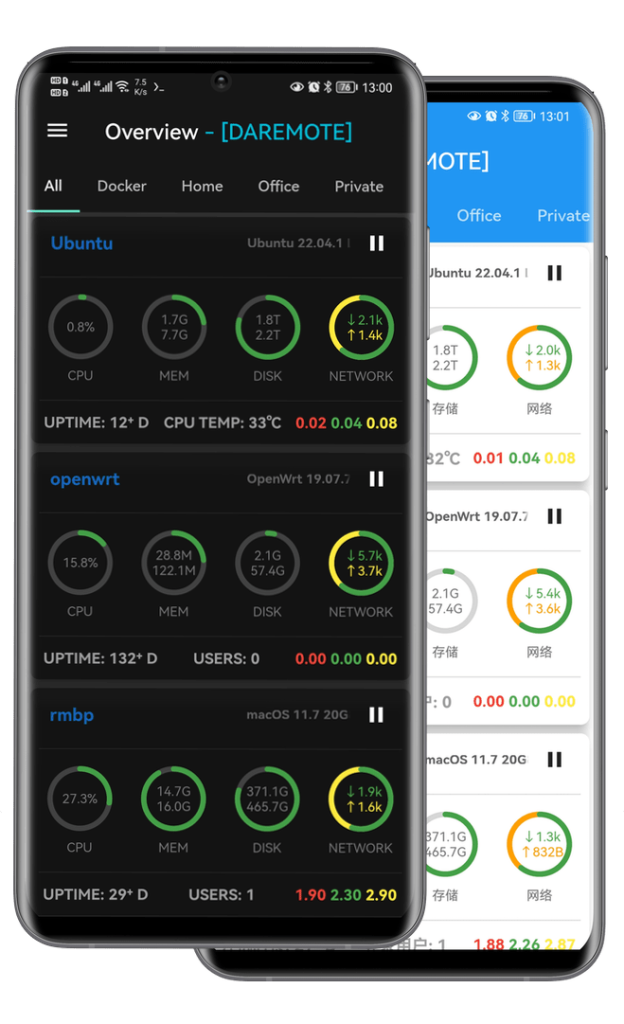
Key Features :
- Visual server dashboards: Real-time graphs for CPU load, memory use, disk activity, and uptime.
- Integrated SSH: Launch SSH connections directly from server cards without extra setup screens.
- Server grouping: Organize hosts into logical groups for faster access.
- Custom alerts: Optional thresholds for key metrics so you know when something needs attention.
- Secure key support: Store and use SSH keys securely within the app.
- Quick actions: One-tap reboot, terminate processes, or run predefined command snippets.
Pros :
- Best for monitoring + SSH: Combines server health visualization with remote access in a single app.
- Faster troubleshooting: Metrics help you diagnose issues before or during an SSH session.
- User-friendly UI: Clear dashboards and host organization make mobile ops easier.
- Cross-platform dashboards: Works well on phones and tablets with large screens.
Cons :
- Not purely focused on SSH: If you only want a simple terminal, it may feel heavier than needed.
- Feature overlap: Some admins may prefer dedicated monitoring tools for deep metric analysis.
- Subscription features: Advanced alerting and some dashboard elements may require paid plans.
- Learning curve: Understanding all monitoring features takes a little time.
For anyone tired of launching a terminal only to realize the server is pegged at 100% CPU, DaRemote is one of the most thoughtful JuiceSSH alternatives 2026. It’s particularly well suited to admins who need quick insight into system health alongside traditional SSH access, earning it a unique place among the best SSH clients for Android.
JuiceSSH Alternatives 2026 — Feature Comparison Table
| Feature / App | Termius | ConnectBot | Termux | GSW ConnectBot | DaRemote |
|---|---|---|---|---|---|
| Best Use Case | Professional daily SSH | Simple & private SSH | Power users & devs | Enterprise security | Monitoring + SSH |
| User Interface | Modern and polished | Basic and minimal | Terminal only | Functional, industrial | Visual dashboard |
| Android 15/16 Support | Yes | Yes | Yes | Yes | Yes |
| SSH Key Management | Cloud vault + local | Local only | Manual (Linux style) | Local only | Local |
| Cross-device Sync | Yes (cloud) | No | No | No | No |
| SFTP / File Transfer | Yes | No | Yes (scp, rsync) | No | Limited |
| Server Monitoring | No | No | No | No | Yes |
| Snippets / Commands | Yes | No | Via scripts | No | Yes |
| Open Source | No | Yes | Yes | Yes | No |
| Encryption Support | Modern ciphers | Modern ciphers | Native OpenSSH | Enterprise-grade | Modern ciphers |
| Best for Replacing JuiceSSH | ★★★★★ | ★★★★☆ | ★★★★☆ | ★★★★☆ | ★★★★☆ |
| Price | Free + paid plans | Free | Free | Free | Free + paid |
This table makes it very easy for readers to quickly compare the top JuiceSSH alternatives 2026 and see which of the best SSH clients for Android fits their workflow.
How to Safely Move Away from JuiceSSH Before It Breaks Completely
If you are still using JuiceSSH, now is the time to leave. On Android 15 and 16, many users are already seeing broken key storage, failed logins, and lost identities. To avoid losing access to your servers, follow this migration checklist and move to proper JuiceSSH alternatives 2026 while everything is still recoverable.
Checkout How to Get Lifetime VPS Hosting: One time Payment VPS Server
- Export your SSH private keys
- Open JuiceSSH and go to Identities. For every key you use, export the private key to a secure file. Save it in encrypted storage or copy it to a safe computer. These keys are what allow you to log in without passwords in most of the best SSH clients for Android.
- Write down your server connection details
- JuiceSSH does not provide a clean export for host lists. Manually copy your server IPs, ports, usernames, and any special SSH options. If you used non-standard ports or jump hosts, note those too.
- Backup your port forwarding and tunnels
- If you used local or remote port forwarding in JuiceSSH, write down every rule. You will need to recreate these in your new SSH client.
- Disable JuiceSSH CloudSync
- Old CloudSync servers are unreliable. Do not trust them to keep your data safe. Everything should be backed up locally before you uninstall.
- Import into your new SSH app
- Once you install one of the JuiceSSH alternatives 2026 like Termius, ConnectBot, or Termux, import your SSH keys and rebuild your server list.
Doing this now ensures you can switch to the best SSH clients for Android without downtime or lost access.
FAQs: JuiceSSH removed from Play Store and the best replacements
Below are the most common questions people are asking in 2026 about JuiceSSH, its removal from the Play Store, and the best JuiceSSH alternatives 2026 for Android users.
Is it safe to keep using the old JuiceSSH APK in 2026?
It’s risky. An SSH client handles passwords and private keys. If it’s not maintained, bugs and security issues don’t get fixed, and it can break further on newer Android versions.
What are the best JuiceSSH alternatives 2026 right now?
Most commonly recommended JuiceSSH alternatives 2026 are Termius, ConnectBot, Termux (with OpenSSH), GSW ConnectBot, and DaRemote.
Which is the best SSH client for Android if I want the same “Identities + Snippets” workflow?
Termius is usually the closest match for a “saved hosts + snippets + polished workflow” experience, especially if you want cross-device access.
Termius vs JuiceSSH 2026: what’s the biggest difference?
Termius is built around modern sync and a centralized vault so your hosts/keys can follow you across devices, while JuiceSSH’s approach was more Android-only and older-era.
What is the best free and open source SSH client Android users recommend?
ConnectBot is one of the most recommended open source SSH client Android options because it’s lightweight and privacy-friendly.
What is GSW ConnectBot and why do some admins prefer it?
It’s a security/enterprise-focused ConnectBot variant that’s often mentioned when people want stronger defaults and a “work device” feel.
Which of the best SSH clients for Android is best for power users?
Termux. It’s more than SSH—it’s a full Linux environment on Android, and you can use OpenSSH like a normal Linux machine.
How do I move from JuiceSSH to Termius?
In practice, it’s manual: export/copy your private keys safely, recreate host entries, then test each connection. (This is the main “how to move from JuiceSSH to Termius” path people follow.)
I loved JuiceSSH because it was simple. Which replacement feels similar?
ConnectBot is closest in “no-nonsense SSH terminal” style. If you want something more modern-looking, Termius is the usual pick among JuiceSSH alternatives 2026.
Which app is best if I want monitoring plus SSH on Android?
DaRemote is often chosen specifically for the “dashboard first, SSH when needed” workflow—useful when you want quick CPU/RAM/disk visibility while you work. (It’s a different approach than classic terminal-only apps.)
What should I back up before JuiceSSH stops working completely?
Your private keys, usernames, hostnames/IPs, custom ports, and all tunnels/port forwarding rules. People losing “identities-like” setups is a common pain point in discussions about switching.
What are the best SSH clients for Android for quick copy/paste and special keys?
Users repeatedly mention wanting good extra keys (Ctrl/Tab/Esc) and reliable paste behavior; Termius and ConnectBot-style clients are typically chosen to solve that pain.
These answers should help you confidently move away from JuiceSSH and choose one of the best SSH clients for Android that fits your needs in 2026 and beyond.
Final Verdict: Which JuiceSSH Alternative Should You Choose?
There is no single perfect replacement for JuiceSSH, but there are now better tools for every type of user. If you want the smoothest experience and the closest upgrade path from JuiceSSH, Termius is the strongest choice. Its clean interface, cloud sync, and key vault make it one of the best SSH clients for Android for professionals managing many servers.
If you care most about privacy and open source software, ConnectBot and GSW ConnectBot are excellent JuiceSSH alternatives 2026. They keep everything on your device and avoid cloud dependencies, which is important for security-focused admins. GSW ConnectBot is especially useful in enterprise or regulated environments.
For power users and developers, Termux is in a class of its own. It turns your phone into a full Linux machine, making it one of the most flexible best SSH clients for Android if you know your way around the command line.
If you manage many servers and want visual insight into performance, DaRemote offers a workflow JuiceSSH never had.
The key is simple: JuiceSSH is gone, but the modern JuiceSSH alternatives 2026 are stronger, safer, and built for today’s Android systems.
Discover more from Owrbit
Subscribe to get the latest posts sent to your email.